
App Store optimization (ASO) is the work of helping the right people discover your app and understand why they should download it. It connects the words people search for, the promise your listing makes, and the evidence your product page provides.
For an independent developer, the useful starting question is where that process is breaking down. Are relevant people seeing the app? Do its name and screenshots explain what it does? Does the experience after download match the promise?
This guide focuses on Apple’s App Store. You will learn what to improve, what to measure, and how to choose a first step for an app that is still in development or already available.
What app store optimization means
ASO combines research, writing, visual communication, and measurement. Keyword research helps you understand demand. Metadata describes your app. Screenshots demonstrate its value. Performance data helps you decide what to investigate next.
A few terms make the work easier to follow:
- Keyword: a word or phrase someone might search for, such as “habit tracker.”
- Search intent: the job behind that search. Someone seeking a daily checklist may want something different from someone seeking a detailed goal planner.
- Metadata: the information supplied about your app, including its name, subtitle, description, and keyword field.
- Storefront: the country or region version of the App Store you are examining.
- Conversion: a desired action measured against a defined opportunity to take it. Always check which actions and denominator a report includes.
Throughout this guide, imagine a fictional habit-tracking app designed around a short daily check-in. Its examples are illustrations, not results from a real customer account.
Your first ASO decision is whom that app serves. “People who want to record a daily routine quickly” gives you a clearer research question than “everyone interested in productivity.”
How people discover apps on the App Store
Search is one discovery route. People also encounter apps through browsing, editorial content, advertising, recommendations, and links outside the store. Those visitors may arrive with different expectations.
Apple describes search results as depending on factors including text relevance-such as the app name, subtitle, keywords, and category-and user behavior, including downloads, ratings, and reviews. Its guidance does not provide a complete ranking formula or fixed weights for those factors. Apple’s App Store search guidance.
Start with the task behind a query. For the example app, “daily habit tracker” is a plausible research candidate. “Project management” might attract people who need team assignments and dependencies that the app does not provide.
Inspect results in your chosen storefront. Record the query, date, and kinds of apps you see. Repeated appearances by a particular type of app can help you interpret the search intent; they do not reveal that competitor’s conversion rate or prove what your app will rank for.
The two jobs of a listing: discovery and conversion
Discovery asks whether the app reaches relevant people. Conversion asks whether the information they see gives them a reason to download it.
Both deserve attention. A clearer screenshot cannot help someone who never encounters your app. More exposure creates little value if visitors cannot understand what the app offers.
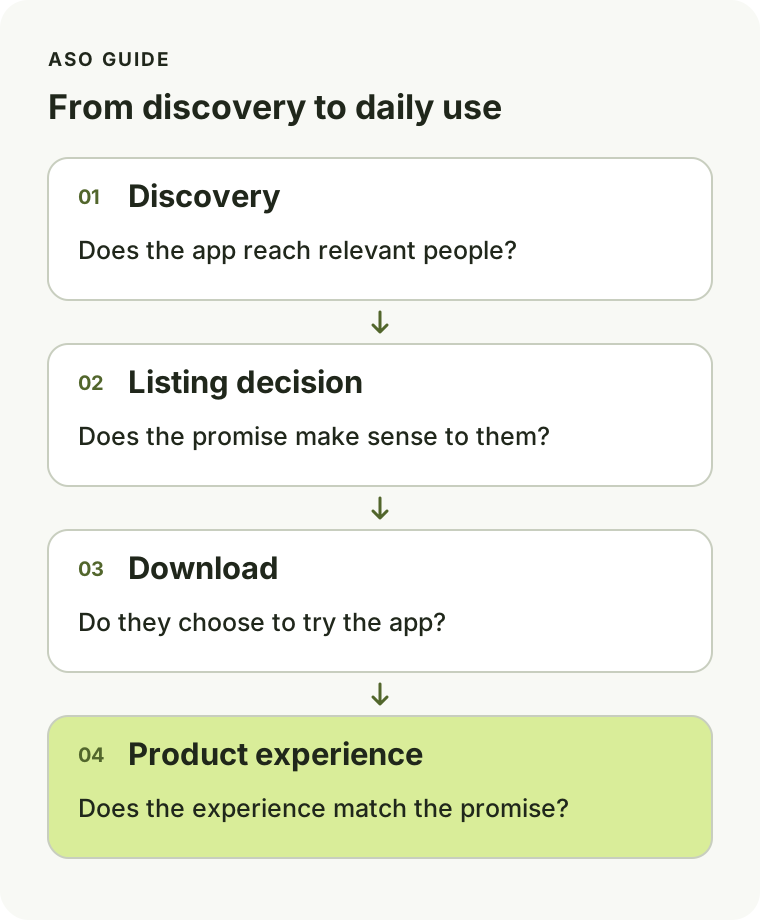
This is a conceptual journey, not a required sequence of screen visits. Someone can download from App Store search results without opening a separate product page.
For the fictional habit tracker, a screenshot caption such as “Track everything. Achieve anything.” leaves the experience vague. “Check off today’s habits” makes a specific promise that a simple daily checklist can demonstrate.
Treat the clearer caption as a hypothesis: test whether the promise matters to the intended audience.
Keep the promise consistent after download
If the listing emphasizes a quick daily check-in but the app opens with a lengthy setup process, the mismatch deserves investigation. ASO can expose a positioning problem that also requires product work.
Ask someone in your target audience to look at the listing and describe what they expect to do first. Then compare that answer with the actual first-use experience. The gap gives you a concrete place to improve.
Which parts of your listing you can improve
Give each element a job before editing it.
| Element | A useful question |
|---|---|
| App name | Can someone recognize the app and understand its purpose? |
| Subtitle | Does it add a specific reason to consider the app? |
| Keyword field | Does it contain relevant search language supported by your research? |
| Icon | Is it recognizable and consistent with the product? |
| Screenshots and previews | Do they show evidence for the main promise? |
| Description | Does it explain capabilities and resolve likely questions? |
| Promotional text | Is there a useful, accurate update to communicate? |
| Reviews and responses | What expectations or recurring problems need attention? |
Apple currently allows up to 30 characters each for the app name and subtitle, and 100 characters for the keyword field. Its product-page guidance explains the individual fields and discourages irrelevant keywords, duplication, and competing app names in the keyword field. Promotional text does not affect search ranking. Apple’s product-page guidance.
Treat those limits as constraints, not targets that must be filled at any cost. A readable subtitle should still sound like a sentence a person would understand.
For the habit tracker, choose one promise for the first screenshot, show the corresponding screen, and use later screenshots to answer follow-up questions. If the first frame promises a daily checklist, a settings screen is weak evidence for that promise.
Use the same discipline when localizing. The audience’s words and expectations should shape the message; translating a weak English listing preserves its weaknesses.
How ASO differs from web SEO and paid acquisition
ASO concerns how an app is discovered and presented within an app store. Web SEO concerns how web pages appear in search engines. Paid acquisition involves paying for distribution, such as advertising placements.
They can support each other, but they require different work. An article answering a developer’s question may bring someone to your website. An ad may introduce the app to a new audience. The App Store listing must still explain the product clearly when that person arrives.
Keep separate records of changes to the listing, website, advertising, and product. If downloads rise during a new campaign, the timing alone cannot establish that a subtitle edit caused the increase.
If potential users cannot explain your app after viewing its page, more exposure alone will not fix the message.
What to measure before making changes
Save a baseline that you can compare with later observations. Include the date range, storefront or territory, device, acquisition source where available, and a record of the listing version.
For an initial review, distinguish these measures:
| Measure | What it helps you examine |
|---|---|
| Impressions | How often the app was seen across the relevant App Store surfaces |
| Product page views | Visits to the product page, which are distinct from search impressions |
| First-time downloads | New acquisition, measured separately from redownloads |
| Conversion rate | Downloads relative to the particular exposure measure used by the report |
| Keyword positions | Visibility observations for selected queries and storefronts |
Apple’s standard Conversion Rate metric divides total downloads and pre-orders by unique device impressions. It is not simply first-time downloads divided by product page views. Apple also distinguishes first-time downloads from redownloads, and usage data depends on users opting to share analytics. Apple’s metric definitions.
Use comparable periods and segments. A worldwide total can conceal a change isolated to one market. A short period with very little activity may not tell you whether a change helped.
Keep a small change log alongside the numbers:
| Date | Change | Expected effect | Other activity | Review date |
|---|---|---|---|---|
| Record the date | Replaced the first screenshot | Make the daily check-in easier to understand | Note any release, price change, or campaign | Choose a review point appropriate to available traffic |
Do you need paid ASO tools?
You can begin with public listing research, conversations with potential users, App Store Connect, and a spreadsheet. A tool becomes useful when it makes a specific task easier to repeat or compare.
Check a tool’s ranking coverage, handling of missing observations, and estimated popularity or difficulty scores. A proprietary score is not an official Apple metric.
How long does ASO take?
Separate the time needed to make a change from the time needed to evaluate it. You can rewrite unclear copy quickly; meaningful evaluation depends on traffic, the change, and competing explanations.
Apple’s Product Page Optimization lets developers compare eligible creative alternatives. Even a sensible hypothesis can lose: Apple’s published Simply Piano example describes a preview-video treatment that underperformed the original page. Apple’s Product Page Optimization examples.
Choose an evaluation method before declaring success. With little traffic, focus on evidence you can collect honestly, such as comprehension feedback and consistent observations, while acknowledging the limits of performance comparisons.
Your first ASO plan, based on your app’s stage
Start with the situation you can observe. The table provides investigation priorities, not diagnoses from a single number.
| Your situation | Investigate first | Produce one useful output |
|---|---|---|
| The app is not published | Audience, search intent, and whether the listing accurately demonstrates the product | A focused listing draft and screenshot storyboard |
| The app has little visibility | Availability, relevant queries, storefront choice, and metadata fit | A researched keyword shortlist and recorded baseline |
| The app receives exposure but few downloads | Traffic relevance, clarity of the promise, screenshots, pricing expectations, and trust | One specific hypothesis for improving the listing |
For the fictional habit tracker, that hypothesis might be: “People cannot tell that recording a habit takes one action. Showing the daily checklist first will make that interaction clearer.”
You can test the clarity of this idea with potential users before treating it as a performance experiment. Ask them to explain the interaction rather than whether they like the design.
Use this first-week checklist:
- Name the audience and task. Write who the app helps and what they want to accomplish.
- Choose one storefront. Keep the initial research narrow enough to interpret.
- Collect candidate queries. Explain why each could describe a supported use case.
- Review the listing’s promise. Compare the name, first screenshots, and actual experience.
- Record the baseline. Save available metrics and note missing data.
- Choose one investigation or change. Write what you expect to learn and how you will assess it.
- Log the decision. Record the evidence, date, and next review point.
The week is an organizing window, not a promise that a ranking change or experiment result will arrive within seven days.
Common mistakes that make ASO harder to evaluate
Pursuing a popular query with the wrong intent. More potential exposure does not make an unsupported use case relevant. For the habit tracker, reject searches that require features it lacks.
Changing everything and crediting one element. A new name, icon, screenshots, and campaign may form a coordinated launch, but the combined result does not identify which change caused it.
Reacting to every ranking movement. Check the observation method and look for a sustained pattern before rewriting metadata in response to a single check.
Copying a competitor’s listing. You can observe the page, but you do not know all the reasons behind its performance. Use it to generate questions, then support your own decisions with evidence.
Stopping at downloads. Review whether the listing attracts people who find value in the app. Poor retention may point to a product issue, an audience mismatch, or both; investigate before assigning a cause.
Your next step: understand search intent
Write down three tasks your intended user might search for. For each, describe the result they would expect from your app. Remove any query whose promise the product cannot fulfill.
That small list gives your first keyword research session a purpose. Continue with App Store keyword research to expand, organize, and prioritize it into a useful keyword shortlist.